Paralives Bills Complete Guide
June 30, 2026
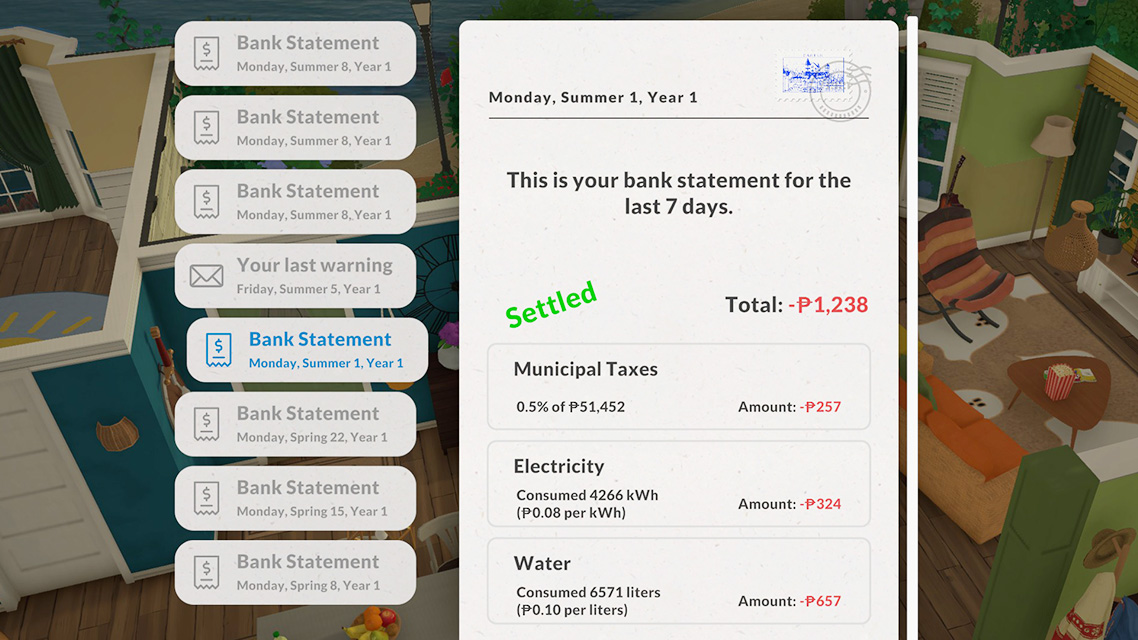
Life in Melino isn’t just about making friends and exploring – the everyday realities of running a household matter too. Every family that owns a lot receives bills that bundle several fixed costs into a single total. This guide explains how bills work, how to pay them, and what happens if you can’t.
1. How Bills Work
Delivery Time
Utility bills are delivered once a week, every Monday.
Payment Deadline
After a bill arrives, you have 24 hours to pay it. Processing the payment takes 5 hours, so don’t leave it until the very last minute.
⚠️ Important: Although you have a 24‑hour grace period, the 5‑hour processing time means you effectively have only about 19 hours to actually click the pay button. Miss that window and you’ll face the consequences.
What’s Included in a Bill
Each bill bundles three main costs:
- Electricity – Charged based on actual usage. The more appliances you run and the longer they’re on, the higher this portion.
- Water – Also usage‑based. Showers and baths are the biggest drivers here.
- Municipal Taxes – Calculated as 5% of the lot’s total value, settled every 3.5 days. The more expensive your house and furniture, the higher the tax.
2. How Much Things Actually Cost
The game calculates costs based on each item’s real‑world usage. Here’s what various items cost per hour when running:
- High‑water appliances (showers, baths): $39 per hour – by far the biggest expense
- Low‑water appliances (sinks, faucets): $7.20 per hour
- Large appliances (stoves, washing machines, etc.): $1.20 per hour
- Electronics (TVs, computers, etc.): $0.36 per hour
- Lights (per lit lamp): $0.059 per hour
How Much Does One Shower Cost?
A 20‑minute hot shower uses roughly 130 litres of water, which translates to about $13 on your Monday bill. When funds are tight, shortening showers is the most effective way to save.
💡 Tip: Hot water is the single largest expense on your bill, far exceeding electricity costs. If you have a large household, even a small reduction in shower time can make a big difference.
3. How to Pay Your Bills
Bills arrive as mail at your household. Once received, you have several payment options:
- Open the bill directly – click the “Settle” button next to the total. The amount is automatically deducted if your household has enough funds.
- Pay via Computer – use any computer on your lot to pay bills.
- Pay via Mailbox – you can also settle bills when checking your mailbox.
💡 Tip: Before you pay, click the Stamp on the bill to add it to your stamp collection – every Monday bill comes with a stamp attached!
4. What Happens If You Don’t Pay
If you fail to pay within 24 hours, or you simply ignore the bill, consequences are real:
- Power Outage – electrical appliances stop working
- Service Cutoff – utilities like water and electricity may be disconnected
The good news is that you can restore services at any time by paying the overdue bill.
5. Tight on Funds? – Subsidies & Income
Automatic Subsidies
Even if you’re temporarily short, the game provides automatic safety nets:
- Child Allowance: If you have children in the household, you automatically receive +$200 – no application required, no conditions.
- Unemployment Benefits: If no one in the household has a job, you automatically receive +$100 to help you get by.
Getting a Job
The most reliable way to stay afloat is to have your Parafolk find work. Entry‑level positions pay around $250** per day, while top roles (like CEO) can earn **$2,100 per day. Each Parafolk can hold multiple jobs simultaneously.
Career Perks
Some careers unlock perks that directly affect your household finances:
- Bonus‑type perks: e.g., CEO’s “Full Company Expense” +$3,000, Accounting Responsibility +$400, etc.
- Paid training: e.g., Health Training –$200, Serious Behaviour Training –$200 – these are investments that deduct money during the activation period but grant skill or behaviour bonuses in return.
6. Practical Tips for Keeping Bills Down
- Shorten showers – hot water is the biggest bill driver; cutting shower time saves the most money.
- Turn off lights when leaving a room – each lamp costs only a few cents per hour, but it all adds up.
- Don’t over‑build – municipal taxes are 5% of your lot’s total value; the fancier your house, the higher the tax.
- Watch the payment window – bills arrive on Monday and must be paid by Tuesday (factoring in the 5‑hour processing time, you need to act even earlier).
- Don’t forget the stamp – collect it before you pay.
- Claim your Child Allowance – it’s automatic, but make sure you have kids in the household.
- Unemployment benefits help – if everyone is out of work, you’ll get +$100 automatically.
7. Cheat Commands
If you’d rather not worry about bills – or you just want a quick financial fix – the game includes a built‑in Cheat Console:
- Press Ctrl + F1 or Ctrl + Shift + C to open it.
- Enter any of the following commands:
generatebill– view all pending billsclearbills– clear all billsclearselectedcharactersbills– clear bills for the currently selected characterfixoutage– restore power and servicescauseoutage– manually trigger a power outagesetmoney [amount]– set household balance to the specified amountprintmoney [amount]– add the specified amount to household fundsJackpot– instantly receive 50,000 Paradimes
💡 Tip: When using
generatebillto view bills, you can still click the stamp on each bill to collect it!
Final Word
Bills are a part of life in Melino – they make the world feel real and give weight to every choice you make. From cutting shower time to building modestly, from claiming subsidies to climbing the career ladder, you have plenty of ways to manage your household finances. And if you ever just want to skip the stress, the cheat console is always there.
Happy budgeting!